We’ve all been there. You open your laptop, look at your to-do list, and see a massive, vague task like “Launch new client project” or “Fix agency onboarding workflow.” Suddenly, an overwhelming wave of executive dysfunction hits. You get an uncontrollable urge to do literally anything else—scroll TikTok for two hours, aggressively deep-clean your baseboards, or stare blankly at the ceiling wondering why adulting is so hard.
That feeling of being frozen isn’t laziness. It’s mental friction. When a project looks too big, too chaotic, or too emotionally taxing, our brain flips into defense mode and opts to procrastinate.
Luckily, there is a brilliant, completely free platform designed specifically to save us from ourselves. It’s called goblin.tools, and it has evolved into the ultimate AI-powered Swiss Army knife for overworked, overwhelmed, and neurospicy brains.
No account creation, no monthly subscriptions, no “premium” paywalls. Just pure, unadulterated productivity. Here is your ultimate guide to all 9 tools on the dashboard and how to use them to fix your workday.
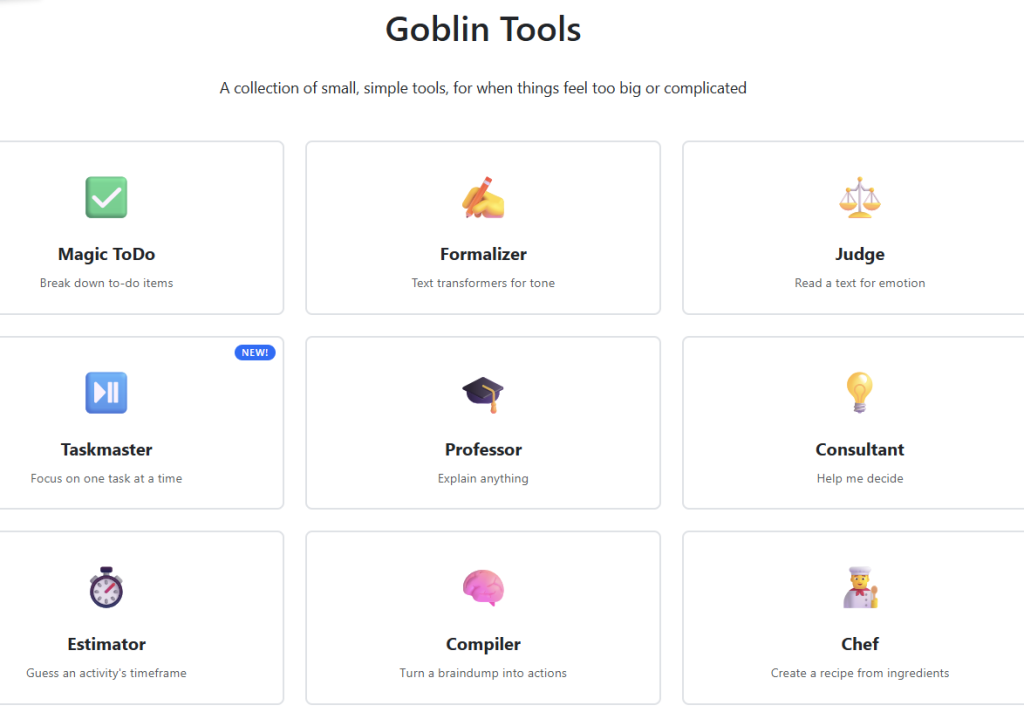
Instead of trying to be a massive, complicated software ecosystem, goblin.tools features 9 single-purpose mini-apps. Here is exactly what they do and why you need them.
1. Magic ToDo (The Overwhelm Crusher)
This is the holy grail of the platform. You type in a scary, monolithic task, and the AI instantly breaks it down into micro-milestones so small that your brain can no longer find an excuse to delay them.
-
The Magic Button: If you type in “Create a Mini Brand Starter Pack for a client,” it will give you a checkbox list starting with 1. Define the brand’s color palette, 2. Choose heading and body fonts, 3. Build 3 Canva templates, and so on.
-
The Spiciness Scale: Next to your task, there is a blue chili pepper icon. This is the “Spiciness” scale from 1 to 5, which represents how overwhelmed you actually are. Set it to 1 for a high-level overview. Set it to 5, and it will break the task down to its absolute atoms (e.g., “1. Open browser, 2. Move mouse to address bar…”). On zero-energy days, it is an absolute lifesaver.
2. Formalizer (The Professional Tone Copilot)
We’ve all drafted a message to a difficult client or a lazy subcontractor when our patience was razor-thin. Before you hit send and accidentally start a corporate war, paste your raw, angry thoughts into the Formalizer. It takes your blunt text and translates it into a perfectly polished, polite, and professional email. You can even set the tone to “more polite,” “more professional,” or “less passive-aggressive.” It’s basically corporate diplomacy on autopilot.
3. Judge (The Emotion Decipherer)
Did a client just reply to your hard work with a short, cold, “Thanks. Received.”? Before you spiral into anxiety thinking they absolutely hate you and are about to fire you, paste it into Judge. This tool analyzes text for underlying tone and emotional subtext, letting you know if the sender is actually angry or just typing from their phone while waiting in line for coffee.
4. Taskmaster (The Focus Lock)
If you suffer from the chronic urge to multitask—where you end up with 47 open tabs, 3 half-written emails, and zero actual tasks completed—you need Taskmaster. This newer addition to the ecosystem strips away the digital noise and forces you to focus on just one single task at a time, keeping your momentum going until it’s crossed off.
5. Professor (The “Explain It Simply” Engine)
Need to understand a complex technical concept, a new AI integration, or a confusing tax law, but your brain refuses to read a dry, 20-page manual? Type it into the Professor. It will explain absolutely anything to you as if you are a smart human who simply doesn’t have time for academic jargon.
6. Consultant (The Decision Maker)
Analysis paralysis is real. When you are stuck at a crossroads—like deciding between two marketing strategies, two design concepts, or even whether you should take on a specific client—the Consultant steps in. It acts as a neutral sounding board, asking you the right questions and giving you structured advice to help you finally make a choice.
7. Estimator (The Time-Blindness Cure)
“Oh, this landing page layout will only take me 15 minutes.” Four hours later, you are still adjusting the padding. If you suffer from severe time blindness, the Estimator is your reality check. Type in any activity, and it will guess a realistic timeframe based on its true complexity, helping you plan your day without lying to yourself.
8. Compiler (The Chaos Organizer)
If your brain works faster than your hands can type, you don’t have time to make a neat list. Just open the Compiler and literally dump a chaotic, disorganized stream-of-consciousness paragraph of all the random thoughts, chores, and deadlines floating in your head. The Compiler reads your messy text wall and automatically extracts a clean, actionable task list out of it.
9. Chef (The “Burned-Out” Recipe Generator)
At the end of a chaotic 10-hour workday running an agency or creating content, your brain is completely fried. Deciding what to eat feels harder than building a mobile app. Open the Chef, type in whatever random ingredients are left in your fridge (e.g., “half an onion, eggs, stale bread, and sriracha”), and it will instantly generate a step-by-step recipe. No thinking required.
Why goblin.tools Is the Ultimate Productivity Shortcut
-
Zero Friction: You don’t need to create an account, verify a password, or hand over your email address. You just open the bookmark and get to work.
-
Built for Cognitive Variety: Whether you are dealing with executive dysfunction, burnout, ADHD, severe fatigue, or just a chaotic freelance week, these tools meet your brain exactly where it is at.
-
It Builds Momentum: The hardest part of any project is simply the first two minutes. By handling the logistical stress of how to start, Goblin Tools shifts you straight into pure execution mode.
Conclusion: Stop Fighting Your Brain
Stop trying to force your way through severe mental blocks with sheer willpower and caffeine. Next time you find yourself staring blankly at your screen, dreading your workload, don’t panic. Bookmark goblin.tools, delegate the administrative chaos to the AI, and let it build a frictionless path forward for you. Your sanity (and your clients) will thank you.