All right, folks. You’ve got an idea  . Maybe you’ve got caffeine
  . But you don’t have a dev team. Guess what? With Replit and a sprinkle of AI magic
  , you can whip up your own tiny app. Yes, YOU. Even if the last “code” you touched was your gym locker . I’m DJ, and today, we’re turning your imagination into apps faster than you can say “My First Million.”
Let’s break it down. I’ll give you three app ideas—AND the full copy-paste prompt to start. No excuses.
1. AI Follow-Up Email Generator (with real workflow)
 Prompt to paste into Replit
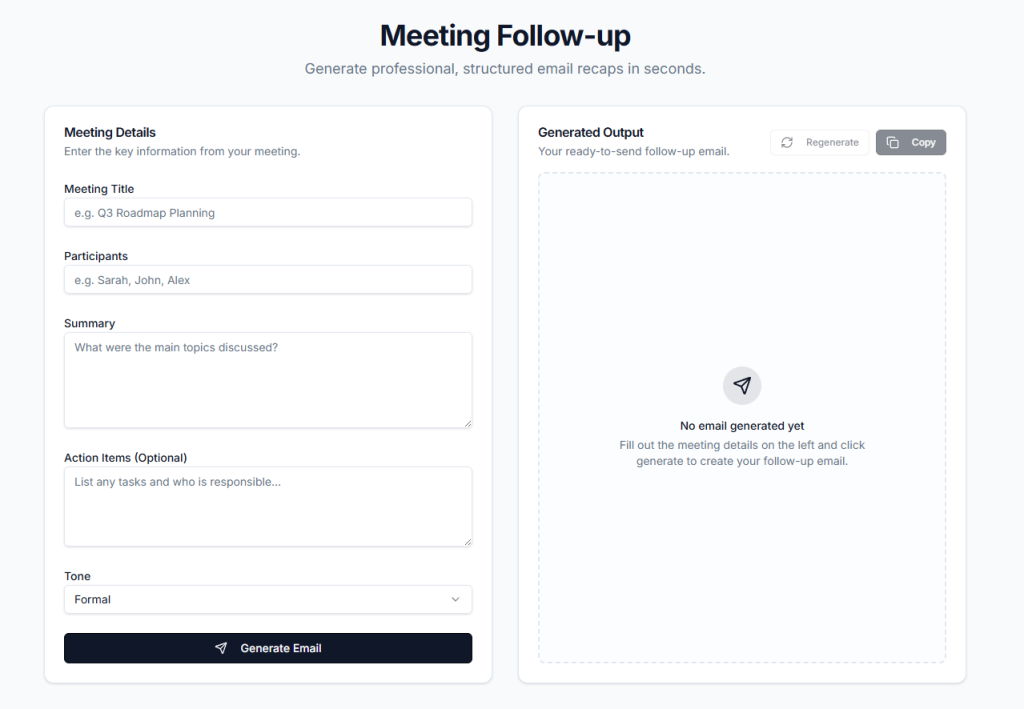
Build a simple full-stack web app using Python (Flask) or Node.js (Express) that generates professional follow-up emails after meetings.
Features:
1. UI:
– A clean form with fields:
– Meeting title
– Participants (comma-separated)
– Meeting summary (textarea)
– Action items (optional textarea)
– Tone selector (formal, friendly, concise)
– A “Generate Email” button
2. Backend:
– Connect to OpenAI API (use environment variable OPENAI_API_KEY)
– Construct a prompt that:
– Summarizes the meeting
– Extracts key points
– Clearly lists action items
– Writes a professional follow-up email
3. Output:
– Display generated email in a formatted box
– Add “Copy to clipboard” button
– Add “Regenerate” button
4. Bonus:
– Add optional Gmail integration using Gmail API to send the email
– Allow editing before sending
5. Prompt logic:
Use this system message:
“You are a professional business assistant. Write clear, concise, and polite follow-up emails.”
User input should be structured into:
– Summary
– Participants
– Action items
6. Keep code modular and simple. Include instructions to run the app.
2. AI Task Prioritizer + Execution Planner
Prompt to paste into Replit
Build a minimal productivity web app that turns a raw task list into a prioritized execution plan.
Tech:
– Frontend: simple HTML/CSS/JS
– Backend: Python Flask or Node.js Express
– Use OpenAI API
Features:
1. UI:
– Textarea input: “Paste your tasks”
– Optional input: “Deadline (optional)”
– Button: “Optimize My Tasks”
2. AI Processing:
Send tasks to OpenAI with instructions to:
– Categorize tasks into:
– High impact
– Quick wins
– Delegatable
– Prioritize tasks using Pareto principle (80/20)
– Break top 3 tasks into step-by-step action plans
– Estimate time per task
3. Output:
– Section 1: Prioritized task list
– Section 2: Step-by-step execution plan
– Section 3: Suggested daily schedule
4. Prompt:
System:
“You are a productivity expert and startup operator. Optimize for speed and impact.”
5. Bonus features:
– Add “Export as PDF”
– Add “Save session locally”
– Add simple dashboard view
6. Keep UI extremely clean and fast. Focus on usability.
Now, you’re a productivity machine. Or at least you’ll look like one.
3. AI Content Idea Machine (Newsletter + LinkedIn ready)
Prompt to paste into Replit
Build a simple AI-powered content generator app for social media and newsletters.
Tech:
– Node.js or Python backend
– Simple frontend (HTML + minimal CSS)
– OpenAI API integration
Features:
1. UI Inputs:
– Topic (e.g. “AI in biotech”)
– Target audience (e.g. “startup founders”, “scientists”)
– Platform (LinkedIn, newsletter, Twitter)
– Tone (educational, viral, contrarian)
2. Output:
Generate:
– 5 content ideas
For each idea:
– Hook (attention-grabbing first line)
– Short description
– Suggested post structure
– Call to action
3. Advanced:
– Add “Expand idea” button → generates full post
– Add “Make it Shaan Puri style” option
4. Prompt:
System:
“You are a viral content strategist who understands business, startups, and AI. Focus on clarity, curiosity, and shareability.”
5. Bonus:
– Save ideas to local storage
– Copy buttons for each section
6. Keep code modular and easy to extend