Ever generated an AI image that was… almost right?
The style looks good.
The idea is close.
But something is off.
Maybe the lighting feels wrong.
The composition is strange.
Or the subject is doing something completely unexpected.
And the frustrating part?
You might even be paying for advanced image generators… yet the results still feel average.
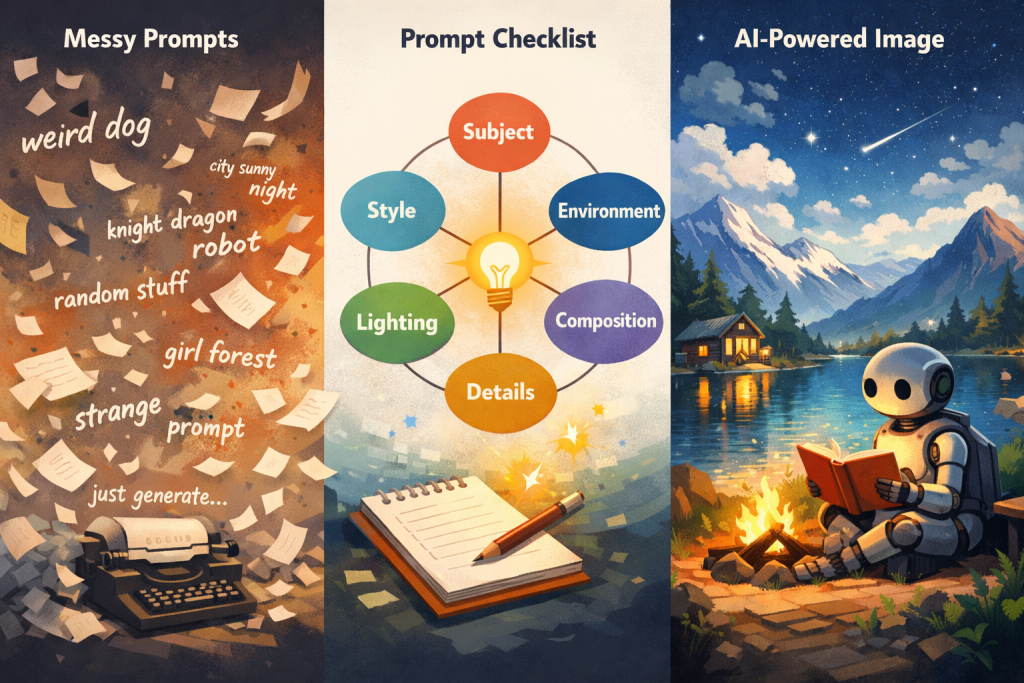
Here’s the truth most people discover sooner or later: The quality of AI images depends heavily on the prompt.
A vague prompt creates vague results.
But a well-structured prompt can dramatically improve the outcome.
So here’s a simple prompt writing checklist that can help you get much better images.
1. Clearly Describe the Subject
Start with the most important thing: what the image actually shows.
AI needs a clear subject before anything else.
If the subject is vague, everything else in the prompt becomes unstable.
Example
 Weak prompt
robot working
 Better prompt
friendly humanoid robot working on a laptop in a modern office
The clearer the subject, the better the result.
2. Specify the Style
AI tools respond strongly to visual style cues.
Without them, the model guesses.
You can specify styles like:
- realistic photography
- flat illustration
- watercolor
- cyberpunk
- Pixar-style 3D
Example
Weak prompt
futuristic city
Better prompt
futuristic cyberpunk city at night, neon lights, cinematic lighting
Style dramatically shapes the image.
3. Define the Environment
Many prompts fail because they forget the context around the subject.
Environment tells AI where the scene happens.
Example
Weak prompt
astronaut drinking coffee
Better prompt
astronaut drinking coffee inside a futuristic space station overlooking Earth
Now the scene becomes visual.
4. Add Lighting and Mood
Lighting changes everything.
You can control the atmosphere using simple cues:
- soft morning light
- dramatic shadows
- cinematic lighting
- golden hour
- neon glow
Example
Weak prompt
city street
Better prompt
rainy city street at night with neon reflections and cinematic lighting
Lighting often separates good AI images from great ones.
5. Control the Composition
Composition tells AI how the scene is framed.
You can guide it with words like:
- close-up
- wide shot
- aerial view
- centered composition
- depth of field
Example
Weak prompt
mountain landscape
Better prompt
wide cinematic shot of a mountain landscape with a small cabin in the foreground
Now the image has structure.
6. Include Details
Small details make images feel intentional instead of generic.
Details can include:
- textures
- materials
- objects
- clothing
- atmosphere
Example
Weak prompt
cafe interior
Better prompt
cozy cafe interior with wooden tables, plants, warm lighting and large windows
Details guide the AI toward richer visuals.
7. Avoid Too Many Ideas
More words don’t always mean better prompts.
If you include too many conflicting concepts, the model gets confused.
Example
Overloaded prompt
futuristic robot in medieval castle cyberpunk watercolor Pixar style realistic photo
Better prompt
futuristic robot standing inside an ancient stone castle, cinematic lighting
Keep the concept focused.