
If you’ve played around with a couple of AI video generators you know what I mean when I say, that’s where the cool images, sometimes they even look really nice like a movie, but building a story is still up to you to write and how you want your story to be told, plus if you want to create a video from an AI editor, all you’ve got to do is write a script and tell it what you want it to make.
Instead of providing narration for videos made by AI, Vexub uses an AI that has generated its own voice-over narration and created images, and built a video from these two sources. The final product doesn’t just include a video clip; it also represents an attempt to produce a narrative by AI, where the AI is attempting to not only create a visual representation of what it sees, but also convey a message through its words. Or so they say…
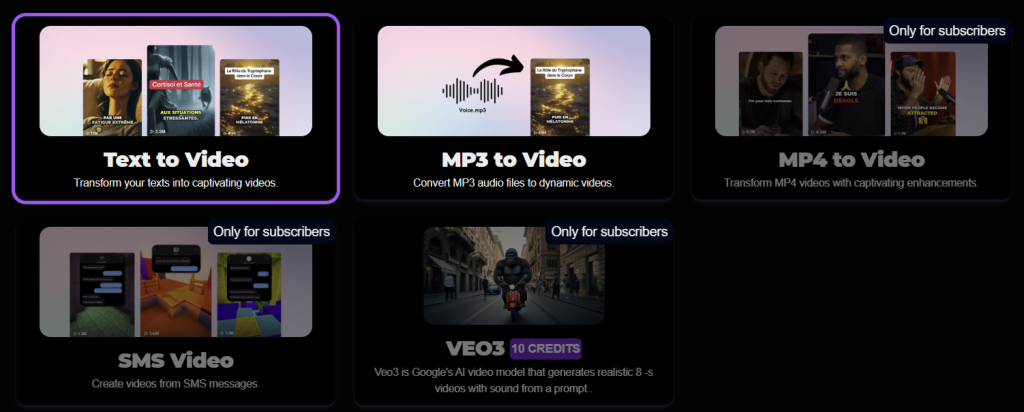
How the Vexub workflow looks in practice
Vexub guides users through a relatively simple, linear workflow that balances structure with flexibility. During our test, the process unfolded across five main steps.
Step 1: Choose the video type
The first step is selecting the video type, which sets the general direction for how the content will be generated. This is where the creative intent is established before any technical decisions are made.
Step 2: Select the format
Next, users choose whether the video should be vertical or horizontal, depending on the intended platform — social media, presentations, or embedded content in newsletters and websites.
Step 3: Choose the narrator
Vexub then allows users to select a visual narrator and a voice. In our experience, the platform offers a surprisingly diverse range of voices, which is a strong point. The visual narrator options, however, felt more limited by comparison. Voice selection is clearly where Vexub is currently strongest.
Step 4: Generate or edit the script
At this stage, users can generate a script from a topic or prompt, edit the AI-generated text, or paste in their own narration entirely. Vexub also provides an estimated video duration based on the script length, which is useful for keeping content within time constraints.
Step 5: Choose an image style
Finally, users select the visual style of the video. Available options include Realistic, Cinematic Comic, Charcoal, Horror, Painting, and Vintage. For our test, we chose Realistic, as it best matched the philosophical and cinematic tone we were aiming for.
From there, Vexub takes over and generates the rest.
Once the narration is generated, Vexub builds the visuals around it. Scenes, camera movement, rhythm, and atmosphere are assembled to match the meaning and emotional direction of the voice-over. The goal is not literal illustration, but narrative alignment — visuals that feel like they belong to the story being told.
The final output is a ready-to-use cinematic clip, typically suited for short-form formats such as newsletters, social media, presentations, or concept demos. But is it any good and is it ready-to-use? Let’s se how our test went…
🧪 Our test: a philosophical meta-prompt
For our test, we deliberately avoided writing any narration ourselves. Instead, we used a meta-prompt instructing Vexub to generate its own narration. The prompt asked for a philosophical and reflective take on the future of artificial intelligence, focusing on the relationship between humans and AI rather than technical explanations or product language.
In practical terms, the test was designed to evaluate whether Vexub could:
- handle abstract ideas, not just visual keywords
- maintain a consistent tone across narration and visuals
- avoid sounding generic or overly marketing-driven
- produce a voice-over that feels natural and intentional
This kind of prompt is where many AI video tools struggle, because storytelling requires coherence, not just image generation.
Test results: strong voice, weak visuals
Our test delivered mixed results.
The AI-generated voice-over worked well, and the avatar’s lip-sync matched the narration convincingly. From an audio perspective, the output felt coherent and polished.
The problems appeared in the B-roll. The visuals relied heavily on generic, stock-like images, mostly animated through simple zooms. Styles shifted from scene to scene, breaking visual consistency and making the edit feel amateurish. Instead of supporting the narration, the imagery often distracted from it and gave the video a cheap, unfinished look.
Final thoughts
Vexubis built around an interesting idea: letting AI take on more responsibility for storytelling, not just visuals. In practice, that ambition is only partially fulfilled. While the voice-over and narration stand out as the strongest elements, the visual execution — especially the B-roll — feels underdeveloped and inconsistent.
On the Like Magic AI scale, we rate Vexub 3/5. It’s a promising tool for quick experimentation and concept testing, but not yet strong enough for polished, story-driven video content. If future updates improve visual coherence and editing logic, Vexub could grow into a much more compelling AI storytelling platform.