|
In the fast-paced world of content creation, efficiency and precision are paramount. Enter Jenni AI, a groundbreaking tool designed to revolutionize the way professionals write. Whether you’re a student, a professional writer, or simply someone who needs to draft reports, Jenni AI is your perfect assistant. In this article, we wanted to do a deep dive into how Jenni AI is used by professionals and scientists to enhance their writing. |
||
Step-by-Step Guide to Using Jenni AI |
||
|
Step 1: Sign Up and Log In |
||
|
– Sign Up: Visit the Jenni AI website and sign up for an account using your email or social media credentials. We used a Google account, and it was super easy. |
||
|
– Log In: Once registered, log in to access the dashboard. |
||
|
Step 2: Create a New Document |
||
|
– New Document: Click on the “Create New Document” button to start. |
||
|
– Template Selection: Choose from templates tailored for different writing needs, such as articles, essays, reports, and more. If you don’t want to use a template, you can create your own or skip this step and start writing. |
||
|
Step 3: Set Up Your Preferences |
||
|
– Tone and Style: Set the tone (formal, casual, technical) and style (persuasive, informative) according to your needs. |
||
|
– Keywords and Phrases: Input any specific keywords or phrases you want to include in your text. You can type in just one word, but to get more precise results, it’s best to describe what you want using as many keywords as possible. The bar below your text will suggest how well you’ve described your idea. |
||
|
||
|
Step 4: Draft Your Content |
||
|
– AI Assistance: Start typing your content. Jenni AI provides real-time suggestions and corrections, enhancing grammar, style, and structure. You can keep or discard the text Jenny produces. If you want, all text can be cited with scientific references, which will be automatically listed at the end of the text. |
||
|
||
|
– Content Generation: If you’re stuck, use Jenni AI’s content generation feature to get paragraphs or even full sections written for you based on your input prompts. You can give unlimited power to Jenni, and it will completely create the text you need, or you can type your text, and AI will help you add text if you are stuck. The second option is probably the best, as automatic text generation can still have some issues, and you always need to check what AI wrote. |
||
|
When you list all your references, you can easily change the citation style, and Jenni will automatically update all references. |
||
|
Step 5: Review and Edit |
||
|
– Grammar and Spelling Check: Jenni AI automatically checks for grammatical errors and spelling mistakes. |
||
|
– Readability: The tool also provides readability scores and suggestions to make your text clearer and more engaging. |
||
|
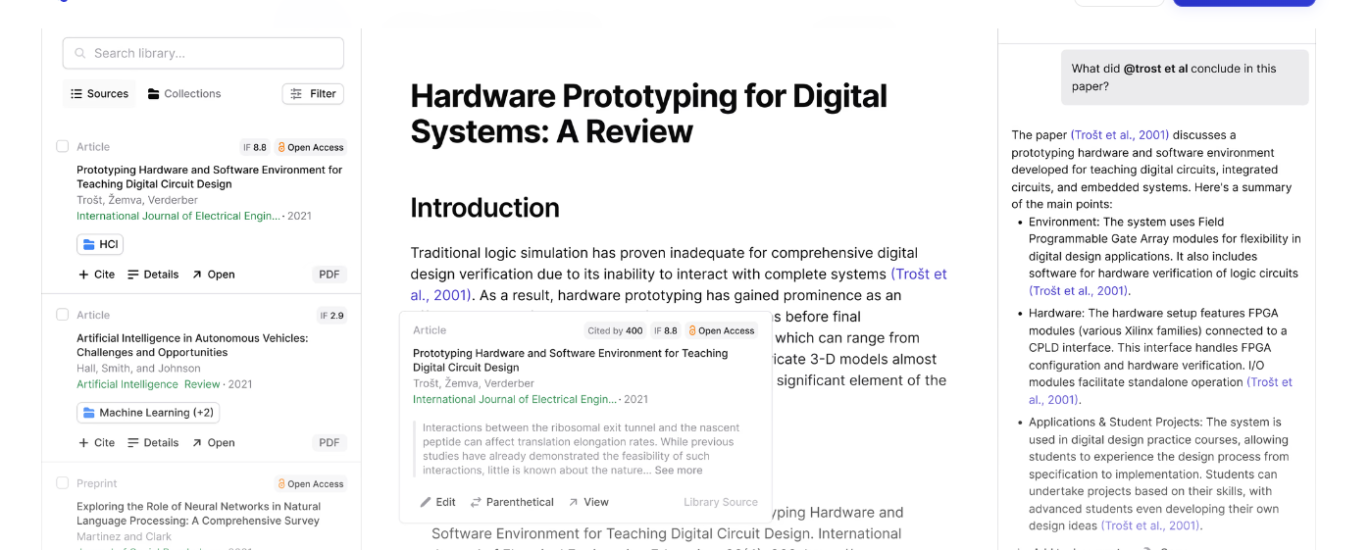
After each text you produce in Jenni, all your sources will be kept in your library on the right side of your panel. You can create your collections and save your references. |
||
|
||
|
Step 6: Export and Share |
||
|
– Download: Once satisfied with your document, download it in your preferred format (Word, PDF, etc.). Or you can just copy-paste it into your word document on your computer. |
||
|
– Share: Directly share your document via email or integrated platforms. |
||
Best Use Cases for Jenni AI |
||
|
1. Academic Writing |
||
|
– Essays and Research Papers: Streamline the process of writing academic papers by getting help with structure, citations, and ensuring your content meets academic standards. |
||
|
– Thesis and Dissertations: Jenni AI helps in organizing complex ideas and ensuring clarity in your thesis or dissertation. |
||
|
2. Professional Writing |
||
|
– Business Reports: Create detailed and well-structured business reports quickly. |
||
|
– Emails and Communication: Draft professional emails with the right tone and clarity. |
||
|
3. Content Creation |
||
|
– Blog Posts and Articles: Generate high-quality blog posts and articles that engage your audience. |
||
|
– Social Media Content: Craft compelling social media posts that capture attention and drive engagement. |
||
|
4. Personal Writing |
||
|
– Resumes and Cover Letters: Create polished and professional resumes and cover letters. |
||
|
– Creative Writing: Get inspiration and assistance in writing novels, short stories, and other creative pieces. |
||
|
Jenni AI offers a free trial with up to 200 words per day and various pricing tiers to suit different needs. Paid subscriptions start at $20 per month or $144 annually (saving 40%). |
||
|
We would add that it is a good and useful tool, especially for saving time, but you need to know what input to give it. You should also be careful about the text it generates because mistakes still sneak in, especially with specific topics. It is also great for use with other tools, such as Consensus and Quillbot. Jenni AI is unique compared to other, more general AI text generators, and we would rate it 5/5 on the LMAI scale. |
||
|
Start your AI journey today and experience the transformation in your writing process. Whether you’re crafting a detailed report or drafting a quick email, Jenni AI is here to make your writing tasks easier, faster, and more efficient. |


About the Author